What Equipment Belongs in a Complete Package?
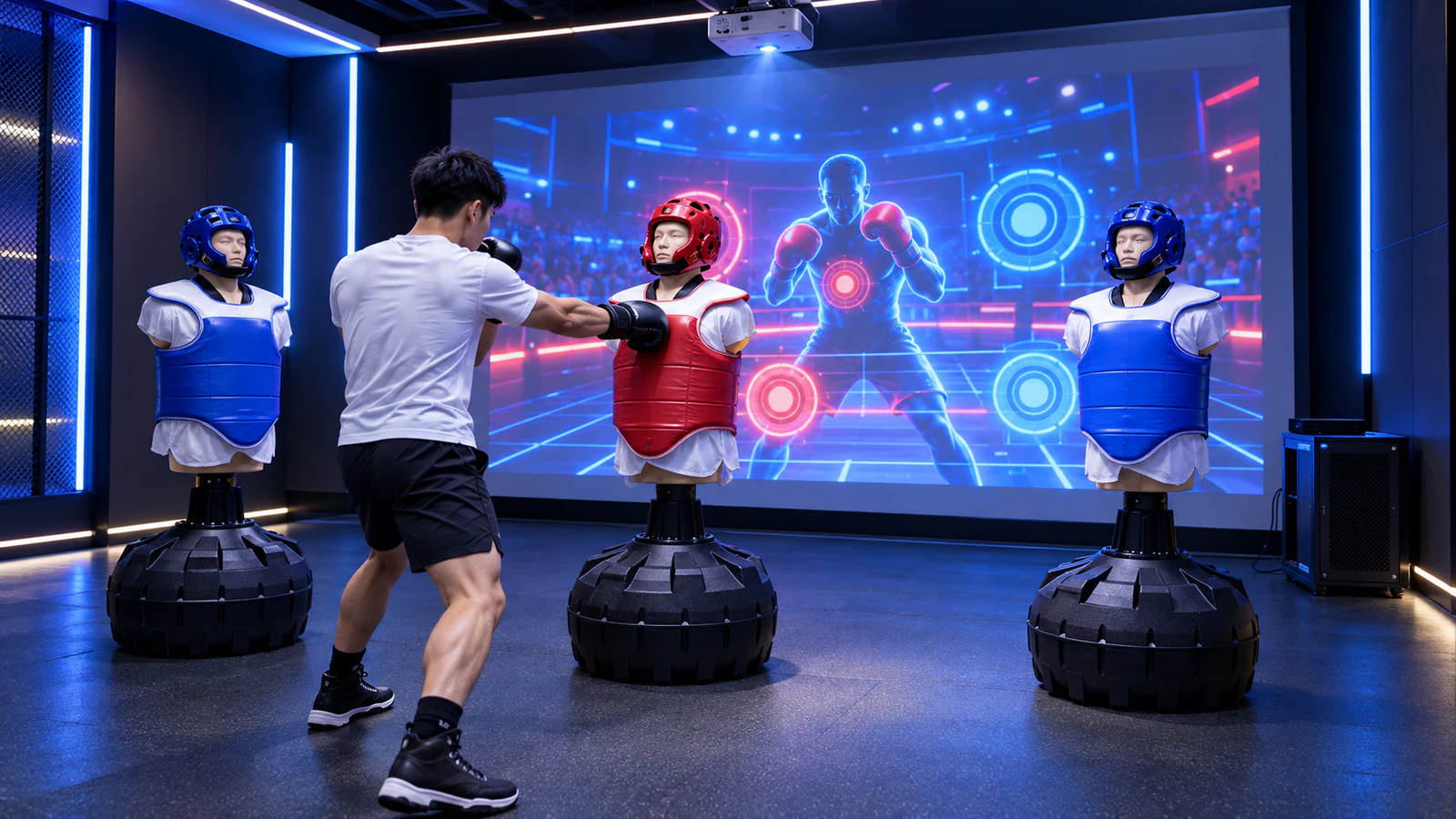
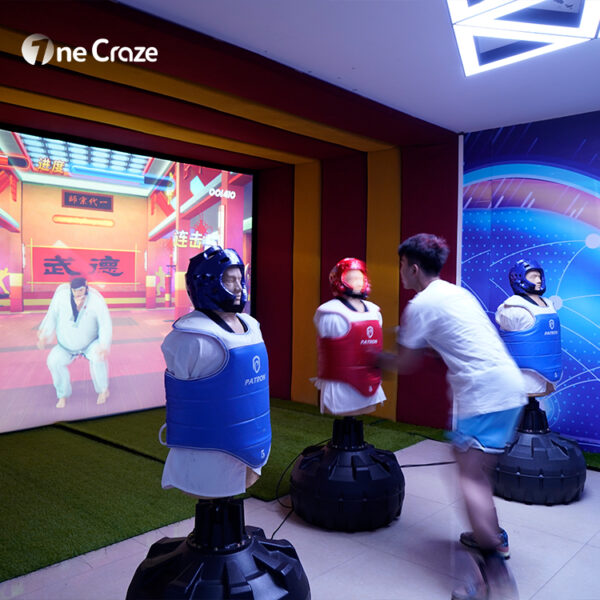
The published OneCraze AR boxing equipment configuration lists three dummy props, vibration sensing, a computer, a laser projector and basic controls. It describes game feedback triggered by striking the dummies. Use that configuration as a starting point, then obtain a current itemized proposal.
The following table is a purchasing checklist, not a declaration that every item comes in the standard package.
| System element | Its role | What the buyer should confirm |
|---|---|---|
| Physical punching targets | Provide the surfaces players strike | Quantity, dimensions, approved striking areas and installation method |
| Sensors and signal interface | Register inputs and pass them to the game | Sensor arrangement, connections and target identification |
| Computer and game software | Interpret inputs and run the experience | Hardware specification, included games and commercial-use terms |
| Projector and image surface | Show instructions, action and results | Exact projector, lens, screen or wall requirements and mounting |
| Audio and operator controls | Provide feedback and allow staff operation | Included speakers, volume control and start, exit and restart procedures |
| Installation and handover items | Make the equipment usable at the venue | Cables, drawings, setup assistance, training and support scope |
Ask the supplier to mark each item as included, optional or customer-supplied. The quotation comparison guide helps separate equipment, delivery and installation responsibilities when offers use different package descriptions.
How Do the Punching Targets Control the Game?
In a target-based setup, the interaction begins with contact against a physical prop. Sensing hardware registers an input, and the software applies the relevant game rule before displaying a response.
That response might relate to target selection, an action prompt or progress through a challenge. However, the exact behavior depends on the delivered game. Ask the supplier to show the complete sequence with the target and projected image visible together.
Hit Detection Is Not the Same as Punch-Force Measurement
A vibration sensor listing does not establish calibrated measurement of force, speed or impact location. Likewise, an on-screen score may represent successful actions rather than a physical measurement.
Before promoting particular metrics, ask:
- Does the system identify which target was struck, or also a specific area on that target?
- Does the score depend on timing, hit count, sequence, measured force or another rule?
- How does it distinguish repeated strikes from vibration following one strike?
- Can movement of an adjacent target produce an unintended response?
These questions make the demonstration more useful without assuming features the system has not verified. Request tests using the supplier’s approved operating procedure rather than inventing an impact threshold yourself.
What Does the Projection Installation Need?
The published OneCraze specification lists a 4,200-lumen laser projector and a 4 × 2.5 m space requirement. Treat these as product-page reference figures, not proof that every room of those dimensions is suitable. Confirm the projector model, brightness measurement standard and complete installed layout.
The drawing should show the targets, player positions, image area and projector location. Then check three practical relationships:
- Sightlines: Players must see the relevant instructions while standing at their assigned targets.
- Image obstruction: Test whether players or equipment block important parts of the projection.
- Access and clearance: Keep entry, exit, spectators and maintenance access outside the required activity clearances.
A projection screen and a punching surface serve different purposes. Unless the supplied design explicitly provides otherwise, players should strike only the approved physical targets—not the wall or screen displaying the game.
Review the projector selection guide for lens and lighting questions. If boxing joins several attractions, the active game center layout guide can help organize circulation around the activity zone.
Which Game and Operator Functions Should Be Included?
Ask for a named game list and a demonstration of each mode in the quotation. “Multiple games” is not enough to explain what visitors will actually do.
The product page states one-to-three-player participation, but the proposal should explain the interaction arrangement. Three physical targets do not, by themselves, tell you whether a particular mode uses separate players, shared target selection or turn-taking.
For each included mode, confirm the following:
- How visitors choose or enter the game.
- Which player or action corresponds to each target.
- What ends the round and how results appear.
- How staff handle a visitor who stops early.
- How the system returns to a ready state for the next session.
Also establish whether startup, gameplay and license activation require internet access. If you need another language, brand graphics or external controls, specify them separately. The custom game software guide explains why changing artwork differs from developing new rules or integrations.
What Should the Supplier Deliver Beyond the Hardware?
A working demonstration should be supported by documents your team can use after installation. Request the equipment schedule, connection diagram, operating instructions, maintenance guidance and the agreed software recovery procedure.
For the physical targets, ask about inspection points, cleaning methods and replaceable wear components. Confirm any required protective equipment and user restrictions in the supplier’s operating documentation. Avoid advertising universal age suitability or professional training benefits without supporting information.
Before shipment, request an uninterrupted demonstration covering:
- Startup and game selection.
- Correct responses from each target.
- The promised player configurations.
- Completion, exit and restart.
- Staff recovery from an interrupted session.
Use the factory acceptance test checklist to record the tested hardware and software version. Repeat the relevant checks after the system reaches its final position; a factory test cannot establish the visibility or layout of your actual room.
Possibly. Provide its exact model, lens, connections and proposed position. The supplier should assess image size, visibility and compatibility before removing the projector from the package.
Not automatically. The target, mounting, sensor and software need to work as a compatible assembly. Request a specific retrofit assessment rather than assuming any bag will produce usable game inputs.
The listed OneCraze equipment configuration specifies a projector and physical targets; it does not list wearable displays. Confirm the supplied interaction format rather than interpreting “AR” as proof that glasses are required or included.