How Does an Interactive Drawing Aquarium Work?
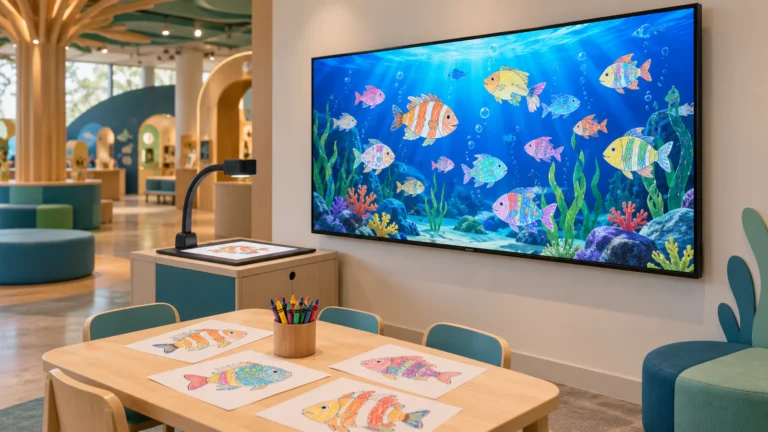
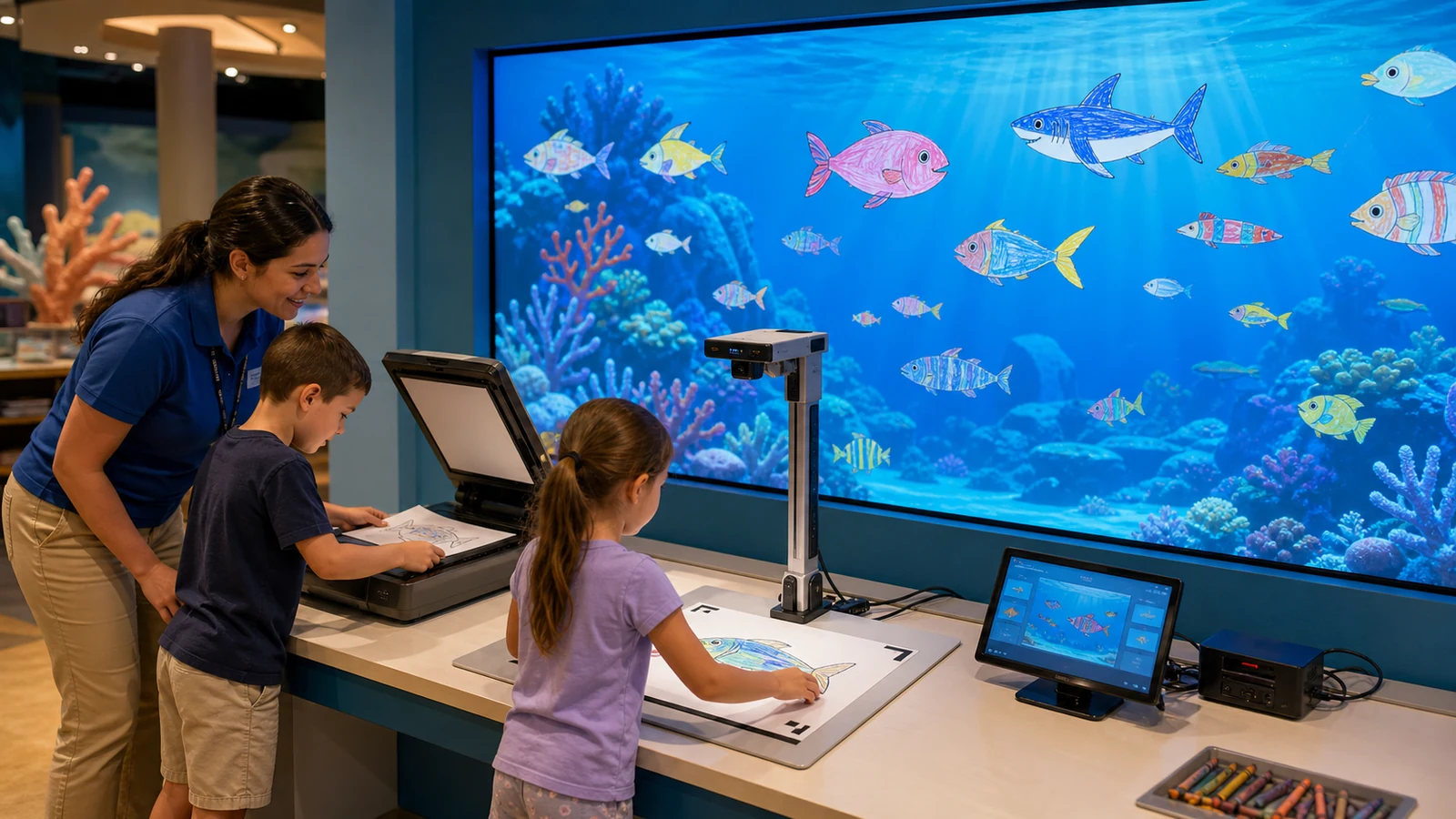
The experience connects a physical drawing activity with a shared animated world. Children select a prepared paper template, add colors and details, submit the artwork and watch a digital version appear inside an aquarium, dinosaur park, space scene or other themed environment.
A typical workflow includes four stages:
- Create: The visitor colors a prepared fish, turtle, vehicle, dinosaur or other character.
- Capture: A scanner or camera digitizes the finished template.
- Recognize: Software identifies the template, extracts the colored region and applies it to the corresponding animated model.
- Display and interact: The new character enters the shared scene and may react to touch, movement or other visitors.
The well-known teamLab Sketch Aquarium demonstrates this basic color, scan and animate journey. However, a commercial buyer still needs to define the scanning station, software license, display equipment, visitor flow, custom content and support scope for the actual venue.
OneCraze offers a paper-based direction through its Interactive Alive Drawing Games. Venues that want a paperless workflow can also review the Interactive Graffiti Draw to Life touchscreen product, which sends digital artwork into the animated scene without printing and scanning paper.
Flatbed Scanner vs Fixed Camera vs Phone Capture
No capture method is automatically best for every project. A flatbed scanner can suit a staffed children’s zone with predictable paper handling, while several fixed camera stations may better support a busy museum. Phone capture can work for temporary events, small venues or web-based experiences where the operator accepts more variation.
| Buying factor | Flatbed scanner | Fixed camera station | Phone camera |
|---|---|---|---|
| Paper positioning | Controlled by scanner bed and page guides | Requires a fixed mat, frame or corner markers | Depends on the user’s angle and distance |
| Lighting consistency | Built into the scanner | Requires designed lighting and glare control | Varies with the room and phone |
| Capture speed | Moderate and model-dependent | Can be fast with a fixed workflow | Varies by user and network process |
| Color consistency | Usually repeatable after configuration | Good when light and camera settings remain fixed | More variable across devices |
| Public-use durability | Familiar mechanism but moving lids can wear | Requires a protected camera and stable housing | Visitor-owned phones reduce venue hardware |
| Multiple stations | Each station needs a scanner and connection | Easier to standardize across several camera stations | Can scale through user devices if software supports it |
| Staff involvement | Low to moderate | Low after visitors understand the station | Often requires instructions or assistance |
| Best fit | Permanent small or medium attraction | High-throughput museum, aquarium or FEC | Event, classroom or lightweight deployment |
When should a venue choose a flatbed scanner?
Choose a flatbed scanner when the software has been designed and tested around that exact scanning workflow. Paper placement is easy to explain, and the scanner’s internal light reduces dependence on room illumination. In addition, the venue can add physical guides so visitors place every template in a predictable position.
Nevertheless, buyers should test lid durability, paper jams or obstruction, scan time, cable length and driver recovery after a computer restart. Ask whether a replacement scanner of the same model will remain available and whether changing the model requires new recognition settings.
When is a fixed camera station better?
A fixed camera can reduce mechanical movement and support a faster place-and-capture workflow. It can also accept paper without closing a lid, which may help when staff process many drawings. The station needs even illumination, a protected lens, a fixed working distance and clear page-position markers.
Camera systems must control shadows, glare, paper curl and hand obstruction. Therefore, the supplier should provide the complete station design instead of quoting a loose camera. The SketchTank FAQ confirms that a document scanner can be replaced with an appropriate mounted camera when the installation requires it, illustrating why the capture method should match the venue rather than follow one universal design.
How Many Scanning Stations Does a Venue Need?
Station quantity should follow visitor throughput, not display size. One large projection wall can receive drawings from several capture stations, while a small wall may need only one.
Begin with the busiest expected period. Then measure or test the average time required to position the paper, capture it, confirm recognition and clear the station for the next visitor.
Use this planning formula:
Hourly Station Capacity = 60 ÷ Average Capture Cycle in Minutes
| Venue condition | Suggested planning direction | Reason to validate on site |
|---|---|---|
| Small staffed play corner | Begin evaluation with one capture station | Staff can assist and manage a short queue |
| Medium FEC or museum zone | Test one station, then model a second for peak demand | Weekend traffic may exceed weekday use |
| High-volume attraction | Use several standardized stations and central monitoring | Parallel capture reduces one-point congestion |
| Unstaffed public installation | Simplify instructions and add remote status monitoring | Visitors must recover from common errors without an operator |
| Travelling event | Favor compact, repeatable stations and fast setup | Equipment must be transported and recalibrated frequently |
The final layout should separate drawing tables from the capture queue. Visitors who are still coloring should not block those ready to scan. Parents also need a viewing position that does not cross the equipment or emergency route.
For broader visitor-flow planning, read the OneCraze guide to interactive projection for museums and exhibitions.
What Equipment Should an Interactive Drawing Aquarium Quote Include?
Request an itemized quotation covering:
- Flatbed scanner, fixed camera station or supported phone workflow
- Capture-station computer or shared processing computer
- Recognition and animation software
- Software license term and number of stations
- Included aquarium and alternative themed scenes
- Number and format of printable templates
- Display computer or media server
- Projector, lens, screen or commercial display
- Motion or touch sensor when characters react to visitors
- Audio equipment
- Drawing tables, station housings and paper guides if included
- Mounts, cables, signal extenders and network equipment
- Operator interface and moderation tools
- Installation drawings and calibration files
- Training, remote support and software updates
- Spare scanner, camera, cables and power supplies
- Packing, freight and on-site service
OneCraze explains the broader product and customization scope in its interactive drawing wall manufacturer guide. Buyers focused specifically on ocean content can also review where to buy an interactive drawing aquarium.
What Should Buyers Test Before Ordering?
A promotional video can show the final animation without proving the capture process. Before purchase, request a live test that begins with blank templates and ends with several drawings moving in the shared scene.
The test should include:
- Colored pencils, crayons and washable markers
- Light, dark and mixed colors
- Neat coloring and marks that cross the template outline
- Slightly curled or wrinkled paper
- Correct and incorrectly positioned pages
- Repeated capture of the same character template
- Continuous processing of at least 20 representative drawings
- Two or more stations uploading simultaneously when offered
- Scanner or camera disconnection and recovery
- Computer restart and automatic software recovery
- Removal or moderation of an unwanted drawing
- Backup and restoration of configuration files
For commercial orders, connect this test to the OneCraze factory acceptance test checklist. The final FAT can verify the actual scanner or camera, computers, license, scenes and accessories that will be packed.
Use the OneCraze article on comparing equipment quotations to normalize display hardware, software, custom content, installation, freight and support between bidders.
A scanner usually provides controlled paper position and lighting, while a fixed camera can offer a faster open-station workflow and easier multi-station expansion. The better choice depends on the software, throughput, staff, station design and maintenance plan.
Some platforms support phone capture. This can reduce dedicated hardware, but the venue must manage device variation, instructions, network access, privacy and moderation. Confirm that the purchased software specifically supports this workflow.
Calculate station quantity from peak visitors and tested capture-cycle time. Also allow for rescans, staff assistance and one station being offline. A single wall can accept drawings from several stations if the software supports concurrent uploads.